HubSpot vs Zoho for industrial & MRO distributors: what each one takes to fit (2026)
A side-by-side for industrial and MRO distributors: how HubSpot and Zoho handle departments inside a customer, equipment on a service date, territories, quotes and your ERP, what 10 reps cost in year one, and a 30-minute test to run on any CRM.
The short answer. HubSpot vs Zoho for an industrial or MRO distributor: Zoho CRM Enterprise puts the distributor essentials in one subscription: territory management, quotes and price books, and custom modules you can shape into customer equipment records, at C$50 per user per month on an annual plan. HubSpot is known for being easy to pick up and puts its marketing tools on the same platform, but the pieces a distributor needs sit in different places: tracking customer equipment takes a custom object, which needs an Enterprise edition of a HubSpot product (Sales Hub Enterprise is US$150 per seat per month plus a US$3,500 onboarding fee), and quotes now live in a separate product, Revenue Hub. Both can be configured to hold departments, equipment and territories. Neither ships "equipment at a customer, due for service on a date" as a ready-made record. If that structure is how you sell, an industry CRM built around it belongs in the same comparison, and this article includes one: ours.
Prices, editions and features below were read on HubSpot's and Zoho's own pages on September 27, 2026. HubSpot lists its prices in US dollars; Zoho shows Canadian dollars to Canadian visitors. Taxes, implementation partners and add-ons beyond the ones named are not included.
At a glance
| HubSpot Sales Hub | Zoho CRM | AlterFlow industrial & MRO CRM | |
|---|---|---|---|
| Price, annual billing | Starter from US$7 per seat per month; Professional US$90 plus a one-time US$1,500 onboarding fee; Enterprise US$150 plus US$3,500 | Standard C$19, Professional C$31, Enterprise C$50, Ultimate C$65 per user per month | Quoted on scope, not a per-seat list price; you own the system and its source code |
| Departments inside one customer | Parent and child companies; a child company can have only one parent | A parent account with member accounts, each with its own contacts | Organization, department and contact hierarchy, with equipment held at the department that owns it |
| Customer equipment with a service date | No built-in record; build a custom object (needs an Enterprise edition, such as Sales Hub Enterprise or Smart CRM Enterprise) | No built-in record; build a custom module (Enterprise: 2 per user, up to 100; Ultimate: 5 per user, up to 500) | Equipment carries its own service cadence |
| Territories, and "a rep sees only their own book" | Teams plus record permissions (a rep sees their own records, or their team's); no dedicated territory module | Territory management in Enterprise (150 territories) and Ultimate (250) | Territory ownership and per-rep books, with isolation enforced in the database |
| Logging a visit with no signal | HubSpot's help says records cannot be created or edited in the mobile app without a connection; the mobile note-taker (Sales Hub Professional or Enterprise) can record offline and attach later | Zoho says its mobile app lets you update records offline and sync later; ask which actions work offline and how duplicates are handled | Capture is held on the device and delivered exactly once when a network appears |
| Quotes and customer price lists | Quotes are part of Revenue Hub Professional or Enterprise, bought alongside Sales Hub | Quotes, products and price books from Professional | Quote records that capture partial wins against what was ordered; a portal with per-customer pricing is a working prototype |
| Link to a distribution ERP | HubSpot builds its own NetSuite integration and a Business Central app (customers sync to contacts, not companies); for Epicor Prophet 21, Acumatica and Sage the apps come from a third-party publisher, Commercient | Marketplace extensions from third parties: Commercient for Prophet 21, NetSuite, Acumatica and Sage; APPSeCONNECT for Business Central | Scoped per engagement; catalogues and sales history move in from exports; no live ERP connector is pre-built |
| Data hosted in Canada | Yes, Canada is one of HubSpot's hosting regions on paid plans | Yes, Zoho offers a Canadian data centre | Deployed in your preferred region (Canada or US) or on your own infrastructure |
| French interface | Yes | Yes | Not published |
| Strongest at | A reputation for ease of use, marketing tools on the same platform, a marketplace of more than 2,000 apps | List prices well below HubSpot's Professional and Enterprise, deep customisation, the wider Zoho suite | Distributor structure built in, and you own it |
About our own column. AlterFlow is young and says so. Its sales and territory CRM is a production build in delivery to a live team, not a product with thousands of customers. The AI assistant that answers questions about a customer is a working prototype. The service and inspection module is in development. Every capability above is labelled the same way on our CRM page.
What makes a distributor's CRM different?
Most CRMs are built around a company, a contact and a deal. An industrial or MRO distributor's book has more shape than that, and the shape is where generic CRMs get stretched:
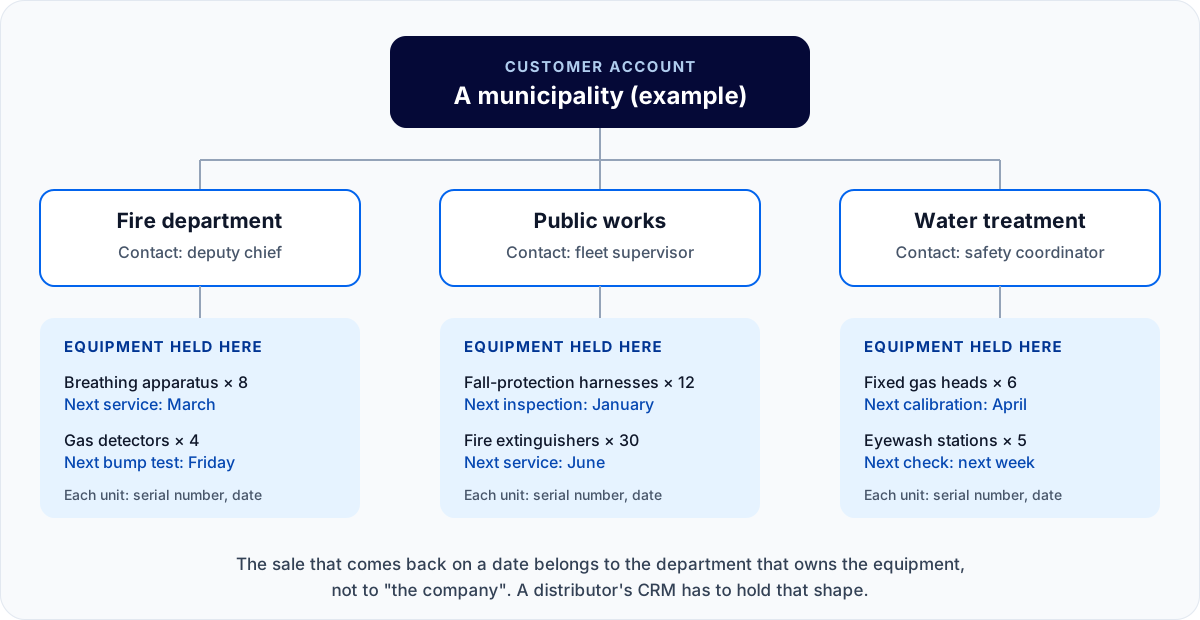
- Your customer is a set of departments. A municipality is fire, water treatment and public works in one account, each with its own budget and its own safety contact. A mill has maintenance stores, a safety office and a purchasing desk. Selling to "the company" misses who signs.
- What you sold comes back on a date. Harnesses on an annual cycle, breathing apparatus on a six-month clock, fixed gas heads on bump schedules. The next sale is often the service, the recertification or the replacement, and it belongs to the department that owns the equipment.
- Territories are ownership, not a filter. Two reps calling on the same account is a commission argument and a confused customer. The system has to know whose book an account is in.
- Reps work where there is no signal. Mine sites, plant basements and rural halls. A note that is lost, or saved twice, is a note reps stop taking.
- What was quoted is rarely what was ordered. A quote for ten lines that lands seven is a partial win, and the reason for the missing three is the most useful thing a rep learns that week.
- The ERP stays the system of record for stock, pricing and invoices. The CRM has to sit beside it, not pretend to replace it.
Hold the two vendors up against those six and the differences in the table above stop being a feature list and start being a project plan.
Is HubSpot a good fit for industrial & MRO distributors?
Where it fits. HubSpot is known for being easy to pick up, and its marketing tools (email, forms, website, lead scoring) sit on the same platform as the CRM. If new business comes mostly from your website and email, that matters. It hosts in Canada, runs in French, and its marketplace lists more than 2,000 apps.
Where it stretches for a distributor.
- Departments: parent and child companies work well for a simple customer, but a child company can have only one parent, so a site that reports to two divisions has to be modelled another way.
- Equipment and service dates: there is no equipment record. You build one as a custom object, and custom objects need an Enterprise edition of a HubSpot product: Sales Hub Enterprise is US$150 per seat plus US$3,500 onboarding, and HubSpot also lists Smart CRM Enterprise from US$75 per seat, so ask HubSpot which combination your reps need. Reminders on those dates are yours to set up with workflows.
- Territories: HubSpot has no territory module. You get close with teams and record permissions, where a rep can be limited to their own records or their team's.
- No signal: HubSpot's help states that records cannot be created, edited or viewed in the mobile app without an internet or data connection.
- Quotes: HubSpot now sells quoting in Revenue Hub, not Sales Hub: "HubSpot's quote software is available with Professional and Enterprise editions of Revenue Hub." For new customers buying Sales Hub, Revenue Hub Professional is currently offered at US$57 per seat per month (listed as down from US$95) on annual billing.
- Your ERP: HubSpot builds its own NetSuite integration and a Business Central app (which syncs customers to contacts, not companies). For Epicor Prophet 21, Acumatica and Sage, the marketplace apps come from a third-party publisher, Commercient, priced and supported separately.
Is Zoho CRM a good fit for industrial & MRO distributors?
Where it fits. Zoho's list prices sit well below HubSpot's Professional and Enterprise editions, and its Enterprise edition includes most of what a distributor asks for in one place: territory management, quotes and price books, custom modules and its Zia prediction models. It offers a Canadian data centre, supports French, and sits in a wider suite (inventory, invoicing, help desk) from the same vendor.
Where it stretches for a distributor.
- Equipment and service dates: like HubSpot, there is no equipment record. You design a custom module (Enterprise or Ultimate) and the workflow rules that remind someone when a date approaches.
- Territories: built in from Enterprise. On Professional and below you rely on roles, profiles and groups; Zoho lists sharing rules from Enterprise.
- No signal: Zoho says its mobile app lets you update records offline and sync later. Test which actions work offline, and what happens when two people edit the same record.
- Your ERP: through third-party marketplace extensions (Commercient for Prophet 21, NetSuite, Acumatica and Sage; APPSeCONNECT for Business Central), priced and supported separately.
- The configuration itself: Zoho's depth cuts both ways. Somebody inside your business has to design the modules, build the workflows and keep them working as people change.
What do 10 reps cost in the first year?
List prices for annual billing, read on the vendors' pages on September 27, 2026, before tax, before any implementation partner, and before add-ons not named in the row.
| Setup for 10 reps | What it includes for a distributor | First-year cost |
|---|---|---|
| HubSpot Sales Hub Professional | Teams and record permissions; no custom objects; no quotes without Revenue Hub | US$10,800 in seats + US$1,500 onboarding = US$12,300 |
| HubSpot Sales Hub Enterprise (one route to custom objects) | Adds custom objects for equipment; quotes still need Revenue Hub | US$18,000 + US$3,500 onboarding = US$21,500 |
| + HubSpot Revenue Hub Professional (for quotes) | Quotes, at the current offer for new Sales Hub customers | + US$6,840 (US$11,400 at the listed US$95) |
| Zoho CRM Professional | Quotes and price books; no territory management; no custom modules | C$3,720 |
| Zoho CRM Enterprise | Adds territory management, custom modules, Zia predictions | C$6,000 |
| AlterFlow industrial & MRO CRM | Built around your departments, equipment and territories; you own the system | Quoted on scope; no per-seat list price |
The price gap between the two vendors is real, but for many distributors the bigger cost in year one is the time spent configuring equipment records, service reminders and territories, whichever product you choose. Ask each vendor, or their partner, for that estimate in writing.
Which one should a distributor choose?
Choose HubSpot if marketing drives your growth, you value a system known for being easy to pick up, and equipment tracking can wait for an Enterprise project or live outside the CRM for now.
Choose Zoho if price per seat matters most, you have someone who enjoys configuring software and will stay to maintain it, and you want inventory and invoicing tools from the same vendor.
Look at an industry CRM such as AlterFlow's if departments inside accounts, equipment on service dates and territory-owned books are the core of how you sell, and you would rather start from that shape than build it. We show you a working prototype shaped around your business before you commit, and the system and its source code are yours.
AlterFlow is not the right choice if you want a subscription you can sign up for today, you need a large app marketplace, or your sales are mostly one-off orders with no service relationship after the sale. HubSpot or Zoho will serve you better.
Test any CRM in 30 minutes, with one of your own customers
Feature lists all read the same. This test does not. Run it in any trial, or bring it to a walkthrough with us, and score each step as built in, you configure it, needs a higher tier or an add-on, or not possible.
- Create one real customer with three departments (for example a municipality with fire, public works and water treatment), each with its own contact.
- Add a dozen units of equipment to one department, each with a serial number and a next service date. Check that they belong to the department, not only the company.
- Move one unit's date to 30 days from today. Who is told, and does the next follow-up appear by itself?
- Log a visit on a phone in airplane mode, then reconnect. Did the note arrive, and did it arrive once?
- Put the account in a territory and sign in as a different rep. Can they open it?
- Quote ten lines, mark seven as ordered, and record why three were lost. Does the pipeline show a partial win, or a won deal that hides the gap?
- Name your ERP and ask who publishes the connector, what it syncs, and what it costs per year.
A CRM that passes steps 1 to 6 as "built in" was designed for a business like yours. One that passes them as "you configure it" can still be the right choice, as long as the configuration is costed and someone owns it.
Frequently asked questions
Is HubSpot good for industrial distributors? It is a good choice when marketing and ease of use come first. For equipment tracking you need a custom object (an Enterprise edition), for quotes you need Revenue Hub, and territories are handled with teams and record permissions rather than a territory module.
Is Zoho CRM good for wholesale and industrial distributors? Yes, especially on price. Zoho CRM Enterprise (C$50 per user per month, annual) includes territory management, quotes and price books, and custom modules you can shape into equipment records. The equipment records and service reminders are yours to design.
Does HubSpot have territory management? Not as a dedicated module. Distributors use teams and record-level permissions so a rep sees only the records they or their team own.
Can HubSpot or Zoho track customer equipment and service dates? Neither has an equipment record built in. Both can hold one if you build it: a custom object on an Enterprise edition of HubSpot, a custom module in Zoho Enterprise or Ultimate, with workflows for the reminders.
Do HubSpot and Zoho connect to Epicor Prophet 21? Both marketplaces list a Prophet 21 connector from the same third-party publisher, Commercient. Check that it covers your version and the data you need before you commit.
Can a Canadian distributor keep its CRM data in Canada? Yes with all three. HubSpot and Zoho both offer Canadian hosting, and AlterFlow deploys in Canada or on your own infrastructure.
See the structure for yourself. The working AlterFlow CRM is open, with no form and no sign-up, on sample records. Or book a walkthrough and bring your messiest account.
Sources, read September 27, 2026: HubSpot Sales Hub pricing, quotes, custom objects, parent and child companies, user permissions, mobile note-taker, data hosting, languages, app marketplace, product catalog, records in the mobile app, NetSuite integration. Zoho CRM pricing, edition comparison, account hierarchy, languages, data centres, mobile, Prophet 21 connector, marketplace. Features and prices change; check the vendor's page before you buy.
Related Posts
How to choose a CRM for an industrial or MRO distributor: the questions to ask before you sign
What an industrial or MRO distributor should ask every CRM vendor, grouped by the way your business works: customers with departments, equipment on dates, territories, quotes, your ERP, access and ownership. Plus the red flags in a demo and the costs outside the licence.
AI-Native vs. Bolting AI On Top: What the Difference Actually Means
A chatbot stapled to one fragmented app is a smart assistant that's blind to the rest of your business. Here are the three things a real AI-native system has that a bolt-on never will.