
Account hierarchy in a CRM for distributors: parent accounts, departments or ship-to addresses?
For industrial & MRO distributors: the four ways a CRM can hold a customer that buys through several sites and departments, the five decisions to make before you build the structure, and what five CRM vendors say about account hierarchy on their own pages.

The short answer. An account hierarchy in a CRM is the way one customer is split into the units that buy from you. For a distributor, the rule that holds up is this: make a separate record for every unit that has its own budget and its own signer, and for nothing else. Where you are unsure, equipment or stock you supply to that unit settles it. A second delivery dock is an address. A shop with its own maintenance budget and a supervisor who signs is a record. Most CRMs give you a parent account with child accounts to do this, and that works when the structure is shallow and each buyer belongs to one unit. It gets harder when one buyer orders for two departments, when you want the parent to show totals, and when two reps share one customer. Decide those three before you build anything.
Vendor facts in this article were read on the vendors' own help, documentation and feature pages on October 5, 2026. We build a CRM for industrial & MRO distributors, so read our view with that in mind. The example customer below is an illustration, not a real company.
What are the four ways to hold one customer in a CRM?
Take a regional power utility as the example. It has a head office with a purchasing group, and three generating stations. Each station has an electrical shop, a mechanical shop and a warehouse, and each of those has a supervisor who signs for what it uses. That is one customer on your invoice run and ten buying units: head office purchasing plus nine shops and warehouses.
| Model | What it looks like | Holds well | Where to look hard |
|---|---|---|---|
| 1. One flat account | One company record, every contact on it, every deal on it | A customer with one buyer and one budget | Ten buying units look like one. Nobody can tell which shop a quote was for |
| 2. One account with ship-to addresses or a site field | One company record, a list of addresses, a "site" label on contacts and deals | Delivery, and telling locations apart in a list | An address has no budget and no owner. The label is only as good as the last person who typed it |
| 3. Parent and child accounts | A company record for the utility, and a company record for each shop or site, linked to it as a child | Separate contacts and deals for each unit, using the standard company record | Each unit is one more company record, so a unit can be entered twice unless you set a naming rule. Check how totals reach the parent, and agree a rule for a buyer who serves two units |
| 4. Departments as their own record inside the account | One organization, with department records under it, and contacts and equipment attached to the department | The buying unit is a record of its own, so a department's contacts and equipment sit together | None of the five vendor pages we cite describes a department record separate from the company record. You configure one, or choose a CRM built around it |
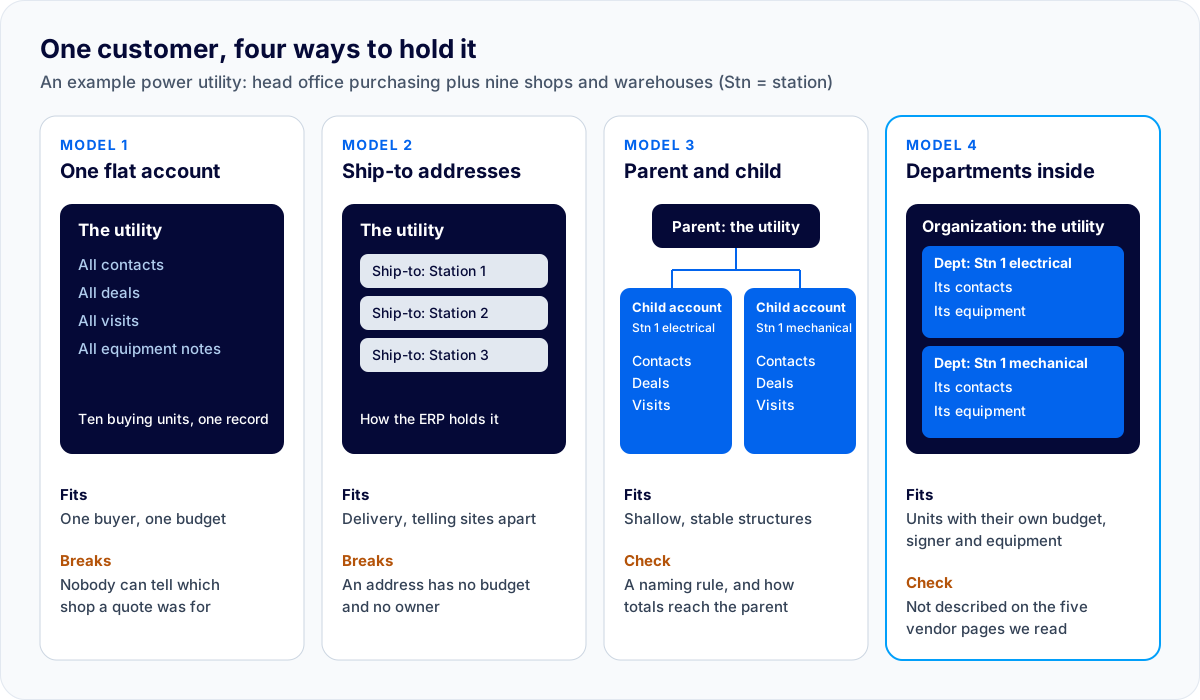
Models 1 and 2 are a common starting point, because that is how an ERP holds a customer: a customer number with ship-to addresses. That is correct for the ERP, which has to invoice one legal entity. We covered that split in CRM vs ERP for distributors. The CRM has a different job, and it needs model 3 or model 4 as soon as more than one person at the customer can say yes.
Which five decisions should you make before you build the hierarchy?
1. What counts as a buying unit?
Use two tests. Does it have its own budget? Does someone there sign for purchases? A unit that passes both gets a record. A unit that passes neither is an address. When a unit passes only one, ask a third question: does it hold equipment or stock that you supply? If it does, give it a record.
In the utility example the nine shops and warehouses pass both tests. So does head office purchasing, which negotiates the contract the shops buy against. The second receiving door at one station passes neither, so it stays an address.
2. How many levels do you need?
As many as there are levels where money is decided, and no more. In the example that is two: the utility, and the shop or warehouse, with the station carried in the unit's name ("Station 1 electrical shop"). Add a middle level for the station only when someone at the station approves spending or needs a report of their own. Every extra level is one more place for a rep to file a visit under the wrong record.
3. What happens to a buyer who orders for two departments?
This is a question the vendors answer differently on their own pages:
- HubSpot says a contact can be associated with more than one company, with one of them set as the primary company.
- Salesforce has a feature called Contacts to Multiple Accounts. Each contact keeps one primary account, and other accounts are added as indirect relationships.
- Zoho CRM's accounts FAQ says: "It is not possible to associate a single contact with multiple Accounts," and suggests a custom lookup field in the Accounts module. A separate Zoho help article, marked "Edition: Enterprise and above", links one contact to several accounts with a multi-select lookup field.
None of these is wrong. Each one is a rule your reps will have to follow, so pick the rule before the first import.
4. What should roll up to the parent?
A sales manager wants one number for the utility: open quotes, won business this year, visits this quarter. How that total reaches the parent depends on the CRM and on how it is set up.
- Microsoft documents rollup columns in Power Apps that an administrator or customizer defines, with examples such as "Total estimated revenue of open opportunities across all accounts in a hierarchy". Microsoft says scheduled system jobs calculate them (the incremental job's default minimum recurrence is one hour) and that a user can recalculate one on the form with the Recalculate button. Ask how this is set up in Dynamics 365 Sales.
- Zoho CRM says member accounts let you "view individual accounts and the consolidated accounts within the parent account". Its feature list also shows rollup summary fields starting in the Professional edition (2 fields per module, 10 in Enterprise, 15 in Ultimate). Ask Zoho which totals appear on a parent account without configuration.
- HubSpot's help page for parent and child companies describes how to link the records, and says child companies are listed on the parent company's record. It does not describe totals. Ask how deal value on child companies is reported at the parent, and on which edition.
- Salesforce's hierarchy page describes a view of the related accounts. Ask how opportunity totals across the hierarchy are reported in your edition.
Write down the three totals your managers will ask for and have each vendor show them on a parent with at least two children.
5. Who owns the customer when it spans two territories?
One station is in the north rep's territory and two are in the south. If ownership sits on the parent, one rep owns units they never visit. If it sits on each child, two reps share a customer and both need to know what the other quoted. Decide which, and then test what each rep can see. Salesforce's page, for one, notes that the hierarchy "doesn't display accounts you don't have permission to view", which protects each book and also means a rep may see only part of the customer.
What do five CRM vendors say about account hierarchy?
Read on each vendor's own pages on October 5, 2026. "Not stated" means the pages we cite do not say, not that the product lacks it.
| CRM | How accounts are linked | One contact in two accounts | What the vendor says about the view and totals | Worth asking |
|---|---|---|---|---|
| HubSpot | Parent company and child company association labels; the page lists "All products and plans". HubSpot says "a child company can only be associated with one parent company" | Yes, with one primary company | Child companies are listed on the parent company's record. Totals: not stated on the pages we cite | How child-company deals and activity are totalled at the parent, and on which edition |
| Zoho CRM | A Parent Account lookup field. Children appear on the parent in a Member Accounts list. Zoho's help defines accounts as "companies or departments within a company" | Zoho's accounts FAQ says no and suggests a custom lookup field; a separate help article shows a multi-select lookup field for this on Enterprise and above | The parent shows "the consolidated accounts". Rollup summary fields are listed from Professional | What "consolidated" covers for deals and activities |
| Salesforce | The Parent Account field, listed for Professional, Enterprise, Performance, Unlimited and Developer editions in Lightning Experience. The Account Site field is suggested for telling office locations apart | Yes, through Contacts to Multiple Accounts, with one primary account | "The Account Hierarchy page displays up to 2,000 accounts in Lightning Experience". Salesforce also says: "You can't view account hierarchies in the Salesforce mobile app." Totals: not stated on the pages we cite | How totals across a hierarchy are reported, and what a rep in the field sees on a phone |
| Microsoft Dynamics 365 Sales | Accounts "can point at their parent account". An administrator designs and publishes a visual hierarchy | Not stated on the pages we cite | A published hierarchy can show an account with its contacts and its open and closed opportunities. Rollup columns can total across a hierarchy on a scheduled job, with a manual Recalculate on the form | Who designs the hierarchy and the rollup columns, and how fresh the totals are |
| Pipedrive | Related organizations, with three relationship types: Parent, Daughter and Related | Not stated on the page we cite | Relationships show in a Related organizations section on the organization's detail view; daughters of one parent become sisters. Totals: not stated | Whether deals on daughter organizations can be reported at the parent |
Two things stand out. First, all five link companies to companies, which is model 3. Second, the link itself is the short part of the work. The contact rule, the totals and the ownership are the parts to test.
How deep should a distributor's account hierarchy go?
Shallow. A structure a rep can hold in their head gets used. A good test: can a new rep, in their second week, file a visit under the right record without asking anyone? If not, remove a level.
Keep the ERP customer number on the top record, and add the ERP's ship-to number to a department where the ERP has one. That lets the CRM's shape follow how the customer buys while the ERP's shape follows how the customer pays.
Map one customer in 15 minutes
Our buyer's guide asks you to write down five real accounts before any demo. This table is the structure page of that exercise, for your most complicated customer. The rows below are sample rows from the utility example; replace them with your own.
| Buying unit | Own budget? | Who signs | Equipment or stock you supply there | Rep who visits | ERP customer or ship-to number |
|---|---|---|---|---|---|
| Head office purchasing | Yes (contract) | None | |||
| Station 1 electrical shop | Yes | ||||
| Station 1 mechanical shop | Yes | ||||
| Station 1 second receiving door | No: address only |
Then answer three questions underneath it. Which person appears on more than one row? Which totals does your manager want for the whole customer? Which rows belong to a different rep? Those three answers are decisions 3, 4 and 5 above, written for your own book.
When is a general CRM's parent and child structure the better choice?
In several common cases. Stay with parent and child accounts in a general CRM when:
- The structure is shallow and stable. A customer with three plants, each with one buyer, fits child accounts well.
- You need a deep corporate tree. Salesforce says its Account Hierarchy page displays up to 2,000 accounts in Lightning Experience, and Microsoft documents account hierarchies and rollup columns that aggregate over a hierarchy. Ask each vendor, or a partner, to show reporting at each level you need.
- One contact works across many of your accounts, such as a consultant or a group purchasing lead. HubSpot and Salesforce both describe a built-in way to relate one contact to several companies.
- You already run that CRM and the gap is only the hierarchy. Adding child accounts and a naming rule is a smaller project than changing systems.
AlterFlow is not the right fit if you need more levels than organization, department and contact, a single contact shared across departments, or consolidated reporting across a corporate tree on day one. What we publish is the three-level structure described below. Anything beyond it is work we would scope with you, not something we claim today. We are also not the right fit if you want to sign up online and start the same day.
How does AlterFlow hold a distributor's customer?
As model 4. Our industrial & MRO CRM page lists it as: "Organization, department and contact hierarchy, with equipment held at the department that owns it." In the sales and territory CRM (Production build, in delivery), each department is its own record with its own contacts and its own budget, equipment sits on the department that owns it, and the rep sees the whole site on one screen before walking in. Production build, in delivery means built and being deployed to a live team, not a product with a long customer list.
Territory ownership and per-rep books are part of the same build (Production build, in delivery), with isolation between reps enforced in the database.
We chose a department record for the reason on our CRM page: each department is its own record with its own contacts and its own budget, and equipment lives on the department that owns it. With child accounts each unit is one more company record, which works too, as long as you agree a naming rule before the first import.
Frequently asked questions
What is an account hierarchy in a CRM? It is the link between a customer's top-level record and the records for the units under it, such as divisions, sites or departments. In the CRMs above it is a link from one company record to another. Its purpose is to keep each unit's contacts and deals separate while still showing they belong to one customer.
Should each ship-to address be its own account? No. Give a unit its own record only if it has its own budget and its own signer. An address that only receives deliveries stays an address, and the ERP already holds it.
Can one contact belong to two accounts in a CRM? It depends on the CRM. HubSpot and Salesforce each describe a way to relate a contact to several companies with one set as primary. Zoho's accounts FAQ says it is not possible and suggests a custom lookup field, while a separate Zoho help article shows a multi-select lookup field that links one contact to several accounts on Enterprise and above. Check the vendor's current page, and decide your own rule first.
Do deals on child accounts add up on the parent account? It depends on the CRM and its setup. Microsoft documents rollup columns that an administrator or customizer defines. The other pages we read do not say, so ask the vendor to show the total on a parent with two children, on the edition you would buy.
How many levels should an account hierarchy have? As many as there are levels where spending is decided. For the kind of customer in this article that is two: the customer and the department or site.
Is a department the same as a child account? Not quite. A child account is a full company record linked to a parent. A department is a record under its organization. Both can hold their own contacts.
See a customer laid out by department. The working demo is open with no form and no sign-up: a prototype on sample records. Add a customer with two or three departments, each with its own contact, and the header lists the sibling departments; equipment sits on the department with a service due date. Or book a walkthrough and bring the 15-minute map of your most complicated customer.
Updated October 5, 2026, the day of publication: the first version gave only Zoho's accounts FAQ on linking one contact to several accounts. Zoho also has a help article that does it with a multi-select lookup field on Enterprise and above, and the article now gives both.
Sources, read October 5, 2026: HubSpot parent and child companies, associate records. Zoho CRM FAQs on accounts, associate a contact with multiple companies or accounts, feature list. Salesforce considerations for using account hierarchy, Contacts to Multiple Accounts. Microsoft visual hierarchies in Dynamics 365 Sales, rollup columns. Pipedrive related organizations. Features and editions change; check the vendor's page before you buy.
Related Posts
CRM vs ERP for distributors: what each one is for, and when your ERP's CRM is enough
For industrial and MRO distributors: which records belong in the ERP and which in a CRM, what the CRM tools inside Prophet 21, NetSuite, Acumatica and Business Central cover according to their own vendors, when that is enough, and how to split the work if you run both.
How to choose a CRM for an industrial or MRO distributor: the questions to ask before you sign
What an industrial or MRO distributor should ask every CRM vendor, grouped by the way your business works: customers with departments, equipment on dates, territories, quotes, your ERP, access and ownership. Plus the red flags in a demo and the costs outside the licence.